@David B
I have made a small Kontakt script for velocity mapping. It is convenient and can be adapted to any Kontakt library, but it still is a pain to fine tune the curve...
What you do is:
- Open Kontakt and the library (Noire in this case)
- Click the KSP button on the top right (below the NI logo and CPU meter)
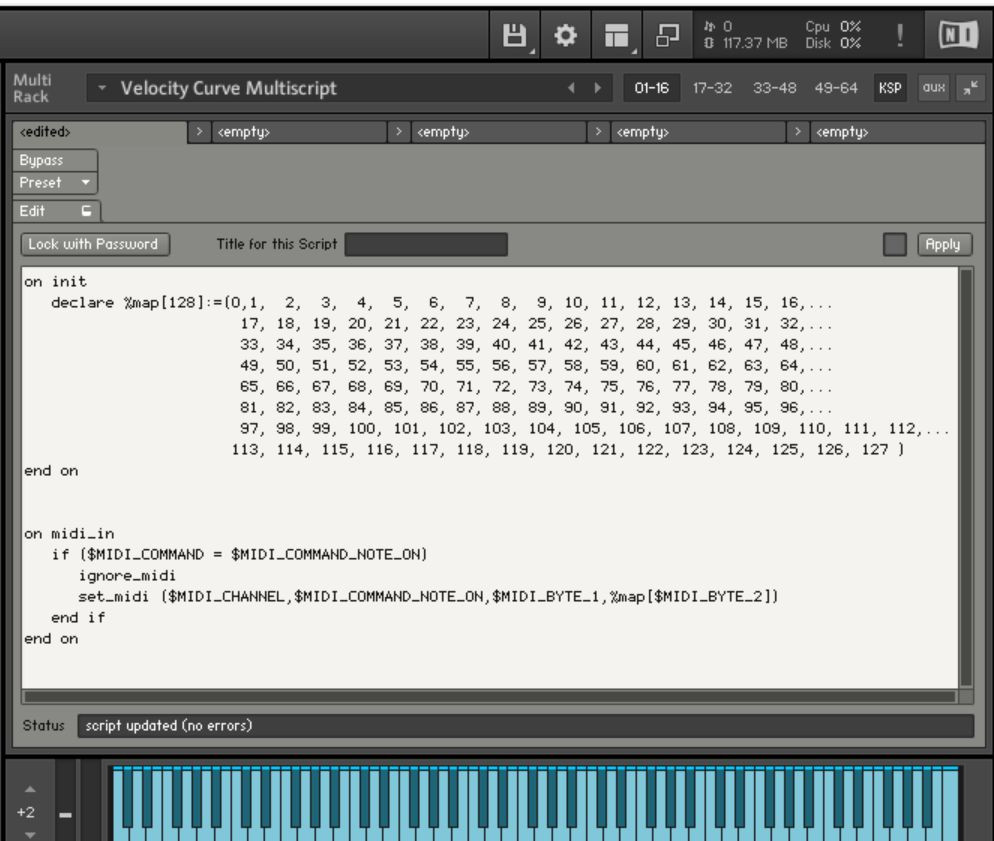
- On the window that opens, paste the following code:
on init
declare %map[128]:=(0, 1, 2, 3, 4, 5, 6, 7, 8, 9, 10, 11, 12, 13, 14, 15, 16,...
17, 18, 19, 20, 21, 22, 23, 24, 25, 26, 27, 28, 29, 30, 31, 32,...
33, 34, 35, 36, 37, 38, 39, 40, 41, 42, 43, 44, 45, 46, 47, 48,...
49, 50, 51, 52, 53, 54, 55, 56, 57, 58, 59, 60, 61, 62, 63, 64,...
65, 66, 67, 68, 69, 70, 71, 72, 73, 74, 75, 76, 77, 78, 79, 80,...
81, 82, 83, 84, 85, 86, 87, 88, 89, 90, 91, 92, 93, 94, 95, 96,...
97, 98, 99, 100, 101, 102, 103, 104, 105, 106, 107, 108, 109, 110, 111, 112,...
113, 114, 115, 116, 117, 118, 119, 120, 121, 122, 123, 124, 125, 126, 127 )
end on
on midi_in
if ($MIDI_COMMAND = $MIDI_COMMAND_NOTE_ON)
ignore_midi
set_midi ($MIDI_CHANNEL,$MIDI_COMMAND_NOTE_ON,$MIDI_BYTE_1,%map[$MIDI_BYTE_2])
end if
end on
It should look like this:
![]()
On the Kontakt menu, click on the "floppy drive icon", choose "Save Multi as..." and save the .nkm file to your location of choice (I suggest the Noire Instrument folder, and name it, for example, "Noire - custom velocity.nkm"), and click the option "patch only" on the save file dialog). When you first launch the nkm instrument it will ask you to use that multi for all instruments. Once in memory, that velocity curve is now applied to all libraries. If you need custom velocity curves for each library (most certainly), when you launch the nkm for the second library, it will replace the one in use, and so forth...
If you look at the code, the velocity is set as linear: 0-127 in steps of 1. Now comes the boring part... What you need is to create a table of velocity-in / velocity-out. My suggestion is to make an excel with one vertical column with values 0 through 127 in the rows. Now start populating a second column with a few mapping values: vel 40 will be 30, vel 60 will be 40 (really flat curve!!!), vel 80 will be 90 (sharp rise), etc. Now fill in values in all empty excel cells. When done, copy the series of values of that second column, and paste into a word doc (paste as "text only" otherwise it will paste as excel object and it will mess everything). Click "Select All", "replace" and replace "p" (code for paragraph break) with ",". It should have changed from:
1
1
2
2
3
3
to: 1,1,2,2,3,3,
Copy that series of numbers and paste into the script code into the %map variable. Click "apply" on Kontakt and see if the velocity is ok.
Two words of caution:
- keep the first two values as "zero" and "one", because vel=0 is a note off for most libraries, and vel=1 is a silent note for a few libraries.
- remember that %map needs to have exactly 128 values separated by ",": thus it should always be:
declare %map[128] := (0,1, 126 more numbers)
I agree: not the most straightforward process, but that is Kontakt.
Hope it helps...