
Skip to content

Build your own hybrid piano - step five, the firmware

RIP

If you haven't already, go back to the previous step at https://pianoclack.com/forum/d/637-build-your-own-hybrid-piano-step-four-the-cables (and to all the previous ones linked in a daisy chain).

Ok, this is pretty lame post, only to show I've done something and to have something out there in the forum in case people are bored. The tl;dr; version is: I'm simply following @JayKominek 's footsteps.

In more details, I saw an in-stock Nucleo board at DigiKey with the exact microcontroller I needed, so I jumped and bought it for experimentation. The website said they had only one in stock, so at first I thought of somebody returning theirs way past the typical 30-day and DigiKey accepting it because of the high demand. Oddly, after I bought that, there was another one in stock, and it remained in stock for about a week. At the same time, these boards popped out everywhere, including the manufacturer's (ST) own website, where it even had discounted price and free shipping!!! I thought the shortage was over!

I was tempted to buy another one (or more) but I did not act immediately… bad move: the boards disappeared from all sites the next day. If I had another one (or more), I could have played main vs ADC board(s), and that would have been very fun (and close to the final arrangement in the piano).

Anyway, I played a bit with the various demos of the board, and everything worked fine. A little more confusing that I'd want, but fine. I loaded @JayKominek firmware for the ADC board, and that also appears to work okay, however I've not fully been able to see the hammer movement in the firmware's variables' values yet (I did see it from a demo ADC with RMA, so I know the hardware is working correctly).

Now, the mandatory pictures to prove I've done it
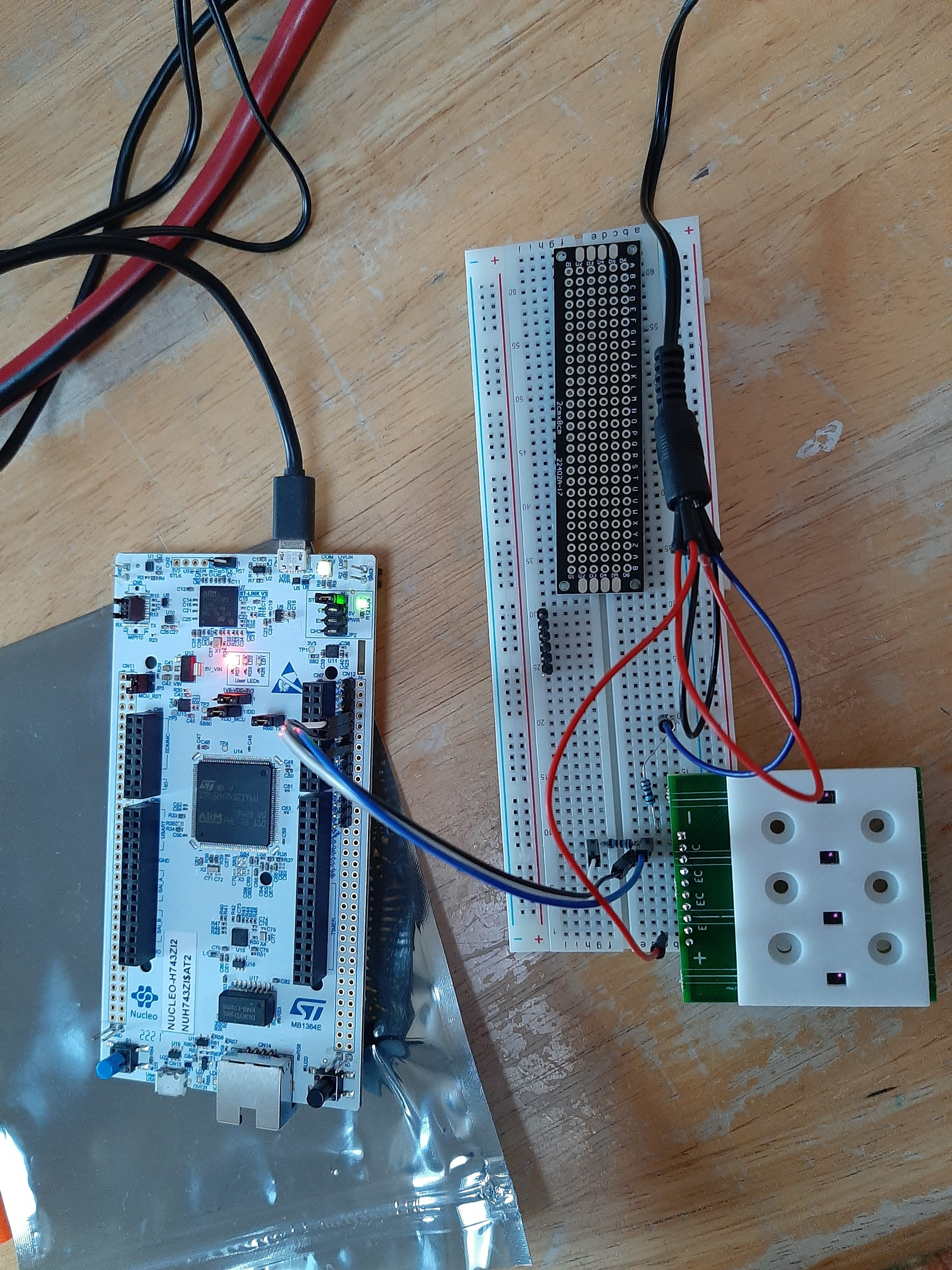
Not sure anybody is following the project that closely, but somebody may notice that I am using a voltage divider (which in turn will modify the phototransistor's bias level) rather than the transimpedence amplifier. I was eager to do stuff, so I jumped straight there, I have the parts for the latter and plan to do that too, perhaps on a different channel to observe differences in behavior.


RIP

Additional small update: STM32CubeIDE and associated tools really suck. They are so slow that put your patience to great test. Everything takes forever (and I mean several minutes for some basic tasks). Things disappear without notice if you inadvertently click on the wrong place. Most things are completely obscure in their wording, location, use. For example, to have a project "disappear" from the GUI you have to "delete" it (but make sure you don't confuse that with "delete from disk" which instead does the obvious thing which you don't want to do). I don't know how anybody could successfully use these tools, unless they use them every day for work (under a "that, or you're fired" threat) and eventually became fluent in all their idiosyncrasies.

Ok, enough of a rant, you can hear more people with more specific complaints here and here

I will switch to gcc/gdb/makefile (which I am already very fluent with) and OpenOCD (which I've never heard about). Let's see how it goes… I suspect I will still need to use Cube 🤮 for project and hardware setup and perhaps some automation, since most documentation assume automatic code generation, e.g. https://github.com/Hypnotriod/midi-box-stm32 -- note the "Generate code" step in their instructions. By the way, I got stuck there for 15 minutes: I could not find any "generate code" menu item or button!!! Only when by desperation I closed the IDE it asked me if I wanted to generate the code…..

Enough for this weekend.


RIP

Typical grumpiness of the underwritten, who becomes really depressed and annoyed this time of the year, continues.

RIP Let's see how it goes…

It goes bad

RIP Additional small update: STM32CubeIDE and associated tools really suck.

https://community.st.com/s/question/0D53W00001IdrjKSAR/unable-to-launchthe-selection-cannot-be-launched-and-there-are-no-recent-launches-stm32cubeide

https://community.st.com/s/question/0D53W00001AzyyOSAR/why-doesnt-stm32cubeide-rename-ioc-file-when-a-project-is-copied?t=1669163820512&searchQuery

I don't want a sucking preview and as such I have to put some text that is not the URL

And don't let me start with how the CubeIDE deals with multiple projects with the same name in different directory or with git, because I'd then break the monitor….

Looking forward to the arrival of spring… or at least of days becoming longer rather than shorter…


dore_m

@RIP We're all behind you on this project. Try not to get discouraged.

If it's any consolation, I think pretty much every embedded platform has problems and bugs that the developer resources can't or won't address. Not sure it's the problem you're running into, but development generally is never very simple. Keep at it!


RIP

dore_m Try not to get discouraged.

Thanks for your kind words. And no, I'm not getting discouraged, just grumpy 😉

dore_m If it's any consolation, I think pretty much every embedded platform has problems and bugs that the developer resources can't or won't address.

Not only embedded platforms, FWIW. However for embedded, often things are worse, I know that. In fact, a couple of things of the RPi Pico have also very serious issues…. I'm reporting here just for people to know, and as a way to vent out. Also note that none of these is for the embedded platform itself, but of the supporting development environment, which is advertized as something to make the whole process easy…


RIP

STM32CubeIDE went out of memory, crashed and now hangs forever (I left it stay for hours) when attempting to open itself.

So what does a Linux nerd do? Simple delete the relevant directory in the home so the software does not try to do what it was doing before. This 💩 of a software has not one, not two, not three, but a whole lot of relevant directories (some hidden, some shown), namely

$.stmcube/$
$.stmcufinder/$
$.STMicroelectronics/$
$.stm32cubeide/$
$STM32CubeIDE/$
$STM32CubeMonitor/$
$.stm32cubemx/$

I deleted

$.stm32cubeide/$
$STM32CubeIDE/workspace_1.10.1/.metadata/$
$STM32CubeMonitor/$
$.STMicroelectronics/$
$.stmcube/$

and now….

it works! (I mean the crappy CubeIDE, not the simple hello-world MIDI I am trying to do: not yet)

Never seen a piece of software so poorly written….


scherbakov.​al

Once I also caught CubeIde in a hung state and a reinstallation was necessary. And until I deleted all the files in various places on the computer, the installer script did not run for installation. Maybe the background installation of updates works in this program in such a way that everything breaks. It annoys me that if you want to change the compilation settings, then you need to go through several dialog boxes. It is also a little frustrating and surprising that after a single debug and subsequently after each compilation, any random file from the project opens on its own. Everything else works. Have you tried Platformio? It seems to me that it is possible to generate a starter project in a cube, and then transfer it to platformio in vscode for example.


scherbakov.​al

There is an interesting framework. Template. Generates super compact firmware. It's a pity that H7 is not supported (

https://github.com/azhel12/Zhele


RIP

scherbakov.​al Have you tried Platformio? It seems to me that it is possible to generate a starter project in a cube,

Thanks for your suggestions.

I have not tried Platformio and I do not intend to do so. If I had to use something non-standard, it would be my favorite "plain-vanilla" gcc toolchain. Sadly that (like Platformio) still needs to rely on CubeIDE for hardware setup and code generation, and that is the problem (as I hinted in an earlier message in this conversation).

In fact, the major problems in CubeIDE happen at the beginning of the project or when one wants to change something for code generation (that was what caused the aforementioned crash: changing the label for a damn LED). For example, at the moment I am banging my head on the keyboard to find how to correctly port your (I assume is yours) very nice https://github.com/ScherbakovAl/midi_for_stm32h7 to my nucleo board, which has the same MCU but with a different package (number of pins and hence functionalities that in your 100-pin packages are hidden/unavailable).

First, I spent an hour just trying to open your project in CubeIDE, because CubeIDE would attempt opening and then everything would disappear without any error message or any other clue. Only with determination and sleuthing I figured out that you renamed the directory from h7_usb_test to midi_for_stm32h7 and that was the problem. Changing back to the original name the project loaded normally. Changing the name of that directory to anything else, continued with the same issue. And the guys at ST are even proud of this product!!! Hell, at least spit a damn error message, about what you don't like, you stupid software IDE programmers 😬😡🤬☠️😤🤬 I hope I don't meet any of them in person when I have a heavy 🔨 or blunt object in my hands….

I guess I'll go for a walk to recompose myself….

[temporarily recomposing myself to conclude more decently this message]

The byte which you have in txbuf[] in the file USB_DEVICE/App/usb_device.c with a double question mark in the comments is made of the two nibbles "Cable Number" (aka CN) and "Code Index Number" (aka CIN) which are part of the USB-MIDI event packages specifications (basically, MIDI packages sent via USB need to have that prefix). Search for the "Universal Serial Bus Device Class Definition for MIDI Devices" document (or ask here) if you care about the details.


RIP

Progress made, some USB-MIDI data sent.

CubeIDE continues to prove itself as bad as it gets, for example being incompatible with itself (!) when files are moved across operating systems (it remembers settings with full paths such as C:\whatever and then complaining when running in Linux that such trees do not exist).

No showstoppers for today, just extremely slow progress. Imagine that for any quarter turn of the screwdriver you have to fully program the 3D movement of a robot to hold it exactly in place and perform the movement. Sigh.

No additional reports planned before next weekend.


scherbakov.​al

Oops) I wanted to answer right away, but got distracted and forgot. But nothing. I was glad that this code on the github could be useful in some way. I didn't expect this code to be built on other machines. Rather, I assumed that a person would make his own clean project, set everything up at his own discretion, and then make the necessary changes to the generated code according to my prompts. But you did it! It's good.

About the question mark in the comments - I don’t remember exactly now, but it seems that when sending midi messages in hi-res format started working and I changed this value (with a question mark), nothing really changed. Messages continued to be sent without problems. And I left a note to later deal with this in more detail. It's just that I didn't find much information about the formation of midi hi-res messages in order to understand exactly what I'm changing. Nothing, I'll figure it out in the future. While I'm fiddling a little with electronic boards and repairing the keyboard. + I switched to ubuntu and it takes time to get used to, understand and set everything up. It takes a lot of time.

Heh .. I remember that I suffered a lot installing CubeIde on Ubuntu. And then my brain exploded trying to connect Cube sync with GitHub. Solid Pornhub))


RIP

scherbakov.​al I wanted to answer right away, but got distracted and forgot.

No worries and thanks!


RIP

After banging my head on the keyboard with STM32 for long enough, I decided to switch to Arduino. I have not banged my head long enough to have a definitive opinion there, but it seems more user friendly.

That obviously required switching to different hardware and as you might have speculated from other random posts I wrote I am now working with (if you are loose enough to allow me to say "working with" instead of "bothering" 🤣) @gzpiano The hardware is open source and available on github -- We purchased it fully (besides optional parts) assembled with a group order as described here

Parts have arrived and the next step is the assembly which will be documented at

https://pianoclack.com/forum/d/1621-build-your-own-diy-hybrid-piano-step-six-putting-it-all-together