Skip to content

NI Noire -- My Best Settings So Far

HZPiano

Hello,

After a year of being curious about NI Noire, I finally bought a license in last Black Friday's sale. On first installation and trial I was shocked -- and not in a good way. I reckoned Noire to be an immediate write-off and was disgruntled to say the least.

What kept puzzling me though were the examples I heard on YouTube, in particular the few by @Gamma1734, which sounded rather acceptable, interesting, and enjoyable to me. This notion kept haunting me and got me trying to create a natural-piano preset from scratch several times over.

Although I am not 100% satisfied yet -- and that in particular concerns the (subtle) timbre in the middle two octaves (actually from middle-C two octaves upwards) which could be just a tad fresher, crisper, and rounder to my ears -- I thought to share my current preset anyway to hopefully help and inspire others. For there are a lot of people unhappy about, and frustratingly struggling with, Noire.

So here goes.

Inital notes:

  • I use the free Kontakt player;
  • Anything I don't mention in this post, is left at the default setting -- either in the Kontakt player or in the Noire instrument itself;
  • I do not discuss the MIDI in routing nor Audio out routing; these of course depend largely on your own system.

1. Volume settings

  • Master volume 0.00
  • Instrument volume -6.0

2. Velocity curve

  • This is to be found behind the 'KSP' button in the Kontakt player, and is not part of Noire itself. In my mind, it is essential to use this curve editor, not the rather primitive option list in Noire itself.
  • The curve example shown here is set for the MIDI input from my Roland FP-10 (at its default/linear 'touch' setting).
  • The 'Shelf' curve type is actually an S-shape, which I changed as follows:
  • Shape 18
  • Min velocity 8
  • Using the right mouse button, I drew a straight line for the part that now shows linear; that line essentially cuts off everything above it (the left convex part of the S, so to speak)
  • Velocity 0 (the leftmost curve column) is then set to output as 0
  • Velocity 1 (the next-to-leftmost curve column) is then set to output as 1 (with the silent strike on velocity 1 in mind)

3. NOIRE Pure and Basic Pure

  • My preset build starts with NOIRE Pure (as opposed to FELT), and then uses the Basic Pure as the starting point

4. Piano shaping

ANATOMY

  • Release samples ON -15.0
  • Resonance Pedal -6.0
  • Overtones ON -39.0

NOISES

  • Pedal ON -27.0
  • -> Rumble -15.0
  • -> Damper -24.0
  • -> Strings -24.0

TONE

  • Low keys +5

SETTINGS

  • Velocity Linear
  • Silent key ON
  • Repedal ON
  • Half pedal ON

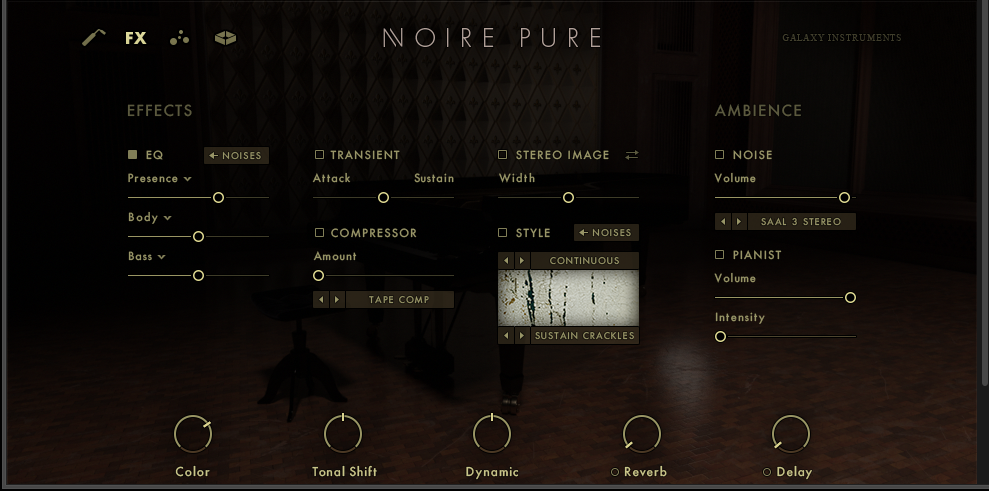
5. FX

EQ

  • Presence +6.0

6. Kontakt Player Output EQ

  • Type Solid G-EQ
  • LMF Gain -6.0 dB / 349.0 Hz

So here it is. Of course everything is "to taste", but I hope this gets you too on your way to a more satisfactory sounding Noire, from the perspective of a natural piano. Whether that actually resembles a Yamaha CFX? Who knows.

A last tip: When you have everything set as you like it, you can save the whole thing as a 'Multi' under the floppy disk icon in the upper left of the Kontakt player. After that, double-clicking on the saved file or on a shortcut to that file, will launch Kontakt player with everything set to go.

Do you have an even better fine-tuning? Let us know!

Cheers and happy playing,

HZ

HZPiano

Hello,

❗ Erratum/Addendum ❗

When I wrote the above post, I said:

HZPiano Anything I don't mention in this post, is left at the default setting -- either in the Kontakt player or in the Noire instrument itself

But that may not be entirely accurate!

Because I did start with Basic Pure but put everything OFF and to zero (or the lowest minus value) first, before then choosing my actual settings one by one.

So in Basic Pure some things may be ON that are now actually OFF in my preset, without me mentioning that in my post. I cannot be entirely sure. So please look closely at the images I posted, those reflect the correct settings and show empty squares/circles where things are OFF, solid squares/circles where things are ON.

Cheers and happy experimentation,

HZ


HZPiano

Hello,

❗ Another Addendum❗

With thanks to @jdg78 at PW for spotting it:

jdg78 wrote

Thanks for sharing! I just tried your settings and they sound great - very clear and natural indeed.

Thanks also for the tip about the EQ controls in the output panel - I hadn't even realized these were there. Will have to play around with them in all my Kontakt instruments now. =)

One comment - In the images you posted, the color knob seems to be adjusted to somewhere around 40%, but I don't think it's mentioned in your text, so I almost overlooked it. Might be helpful to mention this in the text as well.

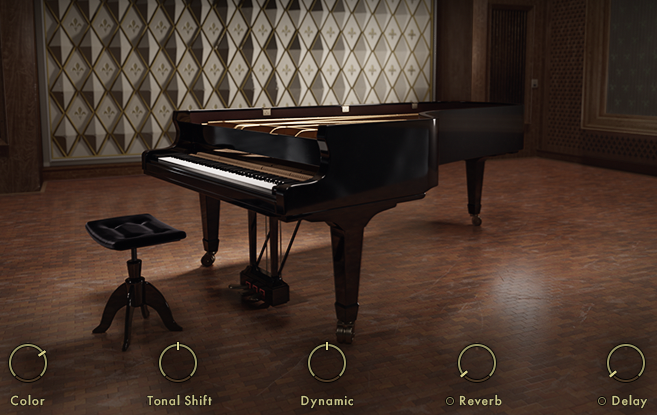
  • The Tone knob is at 42% (and is rather essential in this preset!)

(And: Tonal Shift 0, Dynamic 0, Reverb OFF, Delay OFF).

Cheers and happy presets,

HZ


MrGr

Interesting. Stereo image seems to have not much of an impact in Noire.


HZPiano

Hello,

❗ It seems as if I was all over the place making plenty of mistakes a week ago when writing this thread.

As for…

HZPiano The Tone knob

…it is actually called Color.

With thanks to two PW members asking about this.

Cheers and happy playing,

HZ


David B

HZPiano
Thank you for this helpful thread. I've sent an email to NI to see if I'm eligible for their education discount since I teach classes at our church. I'll buy it if I can get it at 50% off, but I can't afford full price at this time. I look forward to trying your preset if I can get the Noire.

God Bless,
David


navindra

David B Would it work if you send them links to some of your previous VST reviews and ask them for a free copy of Noire in return for an online review? I'm not sure if you can say "no strings attached", but they might still be interested if they see your existing reviews.


David B

navindra I thought about that, but I don't really have enough viewers to be considered a legitimate review channel. I just put content out occasionally when something impresses me. I would definitely review it for a free copy, but I'm sure it would only generate a few views. Probably not worth it for NI.

God Bless,
David


HZPiano

David B I might be interested. Let me sleep on it and I'll get back to you, ok?

Cheers,

HZ


vagfilm

Nice dreams HZPiano... I think you will like Ravenscroft 😇


David B

I've been watching Youtube Noire videos and stumbled across this fine artist. I love this guy's compositions. And the Noire sounds pretty good.

God Bless,
David


David B

More Noire fun with YouTuber "In The Mix." More improvisations (that's what he calls them).

God Bless,
David


David B

I'm enjoying the Noire. Thanks to HZPiano for trading me his Noire for my Ravenscroft/True Keys package.

Some recordings will be forthcoming after I dial it in a bit.

God Bless,
David


HZPiano

David B Thanks to HZPiano for trading

Thanks to you as well, David. We did a nice bit of teamwork this week, even while being some 5,500 miles apart. Enjoyed the process 🙂.

Cheers and happy playing,

HZ

PS I might miss my Noire, time will tell, but then I can always get it again in a sale.


HZPiano

vagfilm Nice dreams HZPiano... I think you will like Ravenscroft 😇

As for this afternoon, I do 😉.

Cheers and happy playing,

HZ


TomLC

Nice sounding piano, David.


JosephW

@HZPiano @David B where exactly can I find and access the 6. Kontakt Player Output EQ settings ?

I feel quite silly that I haven't been able to find it. Thank you in advance!!


HZPiano

JosephW I feel quite silly that I haven't been able to find it.

The Kontakt user interface is often counterintuitive, so nothing to feel silly about!

In the top bar you see a floppy disk icon, cog wheel icon, and then an icon that resembles tiles. If you click that one, you can toggle more windows to be displayed, amongst those the window where you can set up the output signal treatment (I don't remember what the window is actually called, but that'll probably be obvious).

Cheers and happy playing,

HZ


Next Page »