pianow
me : doctor my arm is broken in 3 different places
doc : then don't to those places again, that'll be 300$

me : doctor my arm is broken in 3 different places
doc : then don't to those places again, that'll be 300$
Jane So does that mean - just don't enable half-pedal? What fun is that?
Interesting. Yeah, that's strange. Maybe you could try disabling half pedal samples and try again? I've never had this issue before with the samples loaded, but maybe for your controller, it's best to not load the samples, but still keep the feature on? Just a guess.
David Lai I guess I really don't care, David. If they think this is behaving as intended then so be it.
It works correctly if I disable half pedal. Not sure what you are suggesting? It doesn't seem possible to enable half pedal without loading the samples, although it's possible to load the samples but disable half pedal.
I did try to reply to their email (even though it doesn't reference a ticket number) attaching this zipfile.
It has the same MIDI snippet rendered on the Modern D (same recording as last night), Modern U (very faint after-resonance), and Ravenscroft (very faint after-resonance).
Apparently I'm the only person complaining. But I don't find it at all enjoyable to play unless I disable half pedal.
Jane although it's possible to load the samples but disable half pedal.
It's also possible to enable half pedal but unload the samples. I've done it on my end just now as an experiment.
deleted
pianow Ivory III has modeled pedal up and down resonances, so it has less problems of the engine making decisions about when a certain sample should be played, ETC.
David Lai
btw i don't really get the problem here, what bothers jane exactly? is it a bug or it's just not enjoyable?
pianow btw i don't really get the problem here, what bothers jane exactly? is it a bug or it's just not enjoyable?
There are resonances hanging after she had completely released the sustain pedal. To me, this obviously sounds like a bug. However, it's hard to spot or fix, as they use samples, and it's left to the UVI engine (not the same developer) to make "decisions" as to when to play what sample. So the best middle ground I can think of is to unload the half pedal samples. This at least still means she can do the half pedaling if she wants to, it's just that the samples won't kick in.
It's a rare situation, in that I've never had it with my VPC 1, not even with Modern U or Ravenscroft.
David Lai
oh i get it now
it's interesting that you can do half pedaling without the special half pedal samples
but i wish they'd fix this
virtual pianos like this one are very hard to find so it's a bit frustrating if they don't fix these tiny little issues.
anyway i have two questions for you davy (i said that like it's a new thing)
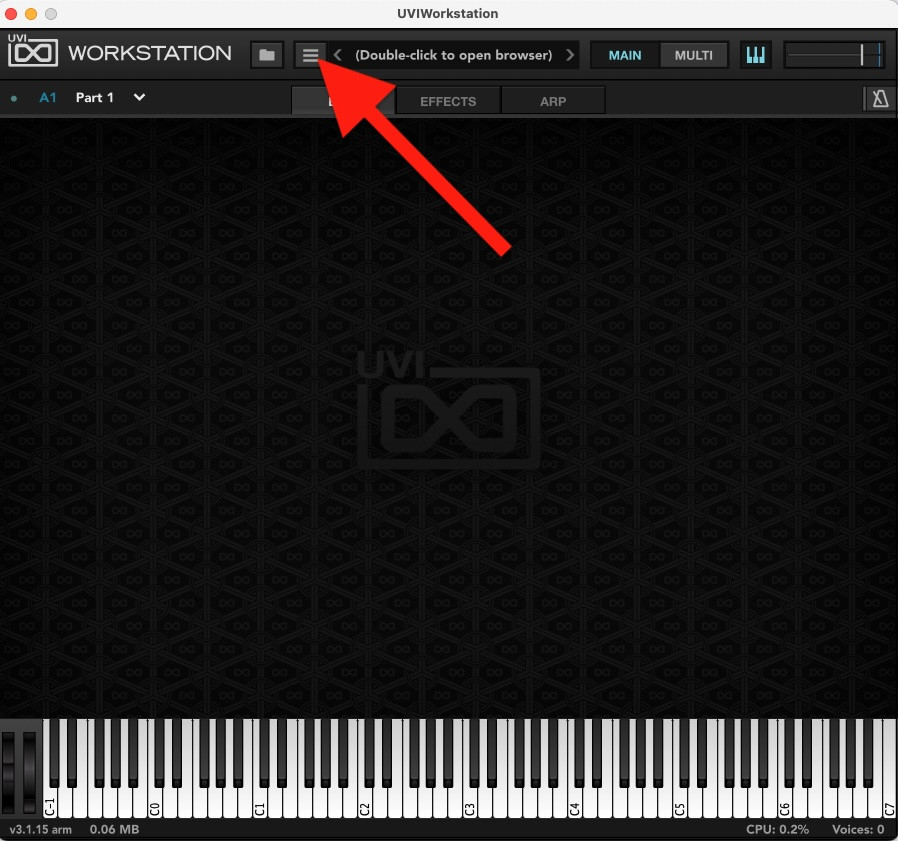
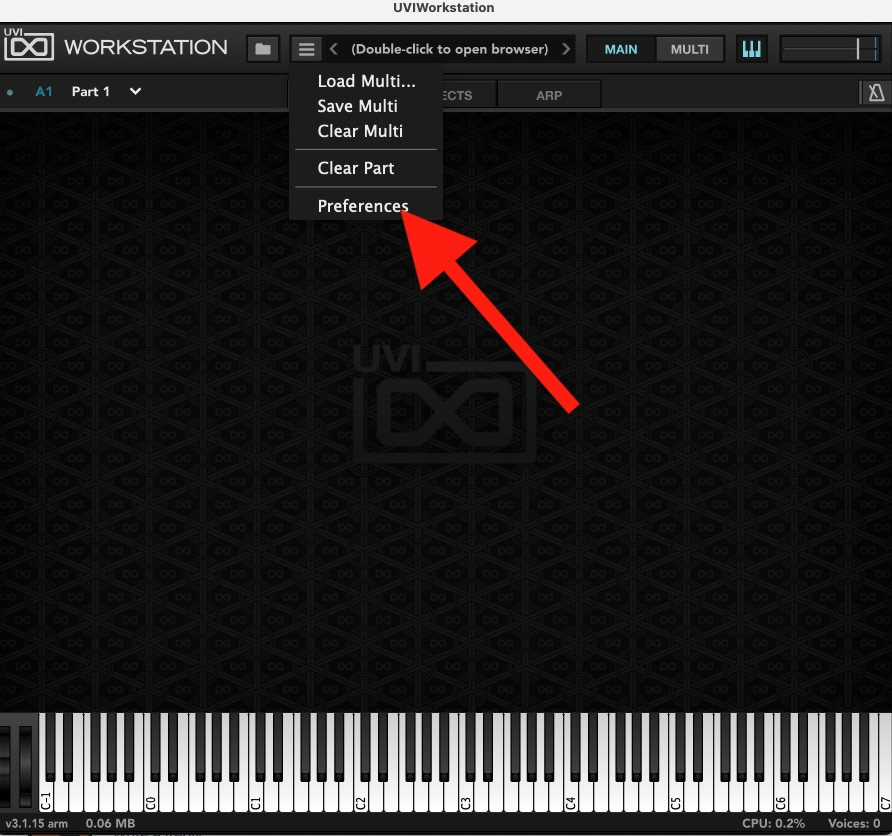
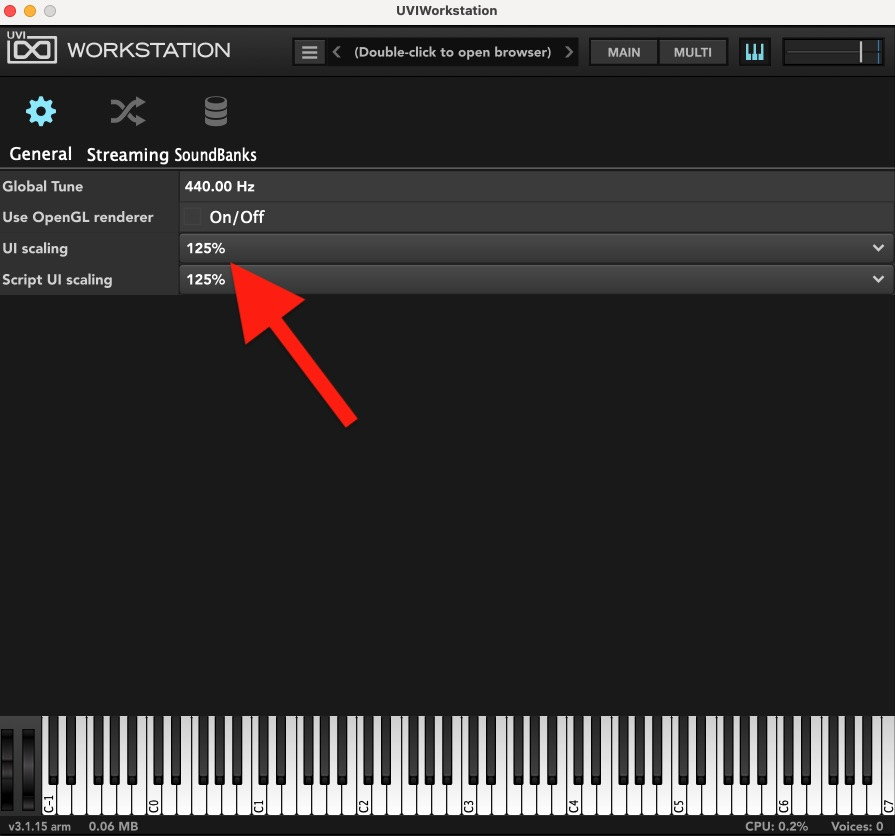
1 can we make the vst screen a bit bigger? i mean is there a option to expand and zoom like vsl?
2 does the timbre knob shifts the keyboard range like the vsl? are we able to play the highest and lowest notes or it takes some of the ends away?
Jane For those playing along at home, I got a reply from
VSLVI Labs to my question about the undamped junk that often happens when I stop playing:
That's a very disappointing response. You did such a good job documenting the anomaly. I hope they respond with a solution to your followup.
I've had pedal problems with my Numa while using the Roland DP10 pedal when in continuous mode with virtual pianos. I think it's a voltage issue. I've been able to correct it by adjusting the pedal parameters in the user interface. You can try adjusting the continuous pedal values on the Modern D. The min/max is set at 54/74 by default. you can try adjusting that parameter either narrowing or lowering. Hopefully, you'll get it resolved.
God Bless,
David
pianow I can’t answer 1 because I can’t see the interface. I can make the plugin interface grow or shrink on reaper using preferences. Is that what you’re looking for?
As for 2, i’m not sure what you’re describing. But if I’m understanding you correctly, the timber shift (hope this is the correct spelling) will shift the sample pitches under the hood, so you can basically make the piano sound bigger or smaller through that. I never use such features, I’m just happy with the sound as recorded. You might find it useful with the music genre that you work with.
David B great response, David! I forgot about the minimum and maximum values!
Yes, Jane. Maybe try David B’s suggestion first. 🙂
pianow 1 can we make the vst screen a bit bigger? i mean is there a option to expand and zoom like vsl?
Yes, UVI has an adjustable user interface.
pianow 2 does the timbre knob shifts the keyboard range like the vsl? are we able to play the highest and lowest notes or it takes some of the ends away?
Timbre shift doesn't drop any notes in the VI Labs Modern U/D like it does in VSL Synchron products.
God Bless,
David
David Lai because I can’t see the interface
oh I'm sorry i forgot❤️
about timber shift feature
i was talking about how does it work with the high and low ends of the piano?
the vsl does it in a very disturbing way, hard to describe, it actually takes some of the high notes away to be able to give you a darker sound and it also takes away some of the low notes while using it to brighten the sound, it decreases the range of the piano, I'm asking if the vi labs does it similarly or not?
David Lai I never use such features
yea for piano playing it's a useless thing but for producers works very well (at low values of course, like -2, the sound gets very unnatural otherwise)
thanks David
thank god, if i may, can you show me how to expand the user interface?
I can't find it
pianow OK, tomorrow when I have time I’ll play with it and let you know.
David Lai
oh no need to spend any time on it David, the other David just answered both questions ❤️
pianow thanks David
thank god, if i may, can you show me how to expand the user interface?
I can't find it
Someone else asked about resizing the UI and I also replied how to do it, maybe even in this discussion. Not to be nagging but there might be some truth about how there are too many threads about Modern D with too much noise over signal 😉
Regarding half-pedaling bugs and VI Labs. As I mentioned, I discovered one such bug since the very beginning and reported it to them. Their response is not exactly what I expected. To be honest, Garritan CFX is better in how it responds to re-pedaling combined with half-pedaling.
Here's how to reproduce it:
play a short (staccato) note in the bass. Shortly after you release it, press the sustain pedal in order to catch it (re-pedaling). Then slowly release the pedal, going gradually through the half-pedaled region.
Result: there's a sudden boost in the volume.
Expected: the note should only decay, even faster, instead of increasing volume.
To me it appears that on half-pedaling they don't restart the sample from the same point as re-pedaling but earlier. They just need to make consistent maps between both. Better yet, no need to have separate notion of re-pedaling. Re-pedaling is the same functionality as half-pedaling where the pedal is fully pressed.
I reported it to VI Labs and they said they couldn't reproduce it and requested files, so I also demoed it:
modern-d-half-pedal-bug.mp3
Here's their response:
This behavior is related to the repedal and half-pedal features working simultaneously,
When half pedal is used, the repedal gets a bit more sensitive to allow note-catching to go a bit longer. In a full playing context, this should all blend together more, but an individual note like this may stick out. On a real piano, you should be able to 'catch' whatever the damper does not fully clear, and some of the note sustain will come back.
The repedal and half pedal features of Modern D is very similar to the ones in Ravenscroft 275 and Modern U, and it seems to work for most cases. We'll look into this though and see if an adjustment can be made, if it the case it will be included in the next update. In the meantime you can also experiment with lowering the Release Xfade value (click the up/down arrow button next to Release Volume to switch).
Their response doesn't make much sense but I hope they can indeed fix it. And experimenting with Xfade is of no help either.
This is not the end of the world for me but I was expecting more from VI Labs to be frank.